



MTA-STS (Mail Transfer Agent Strict Transport Security) is a mechanism that enforces TLS encryption for inbound email delivery to a domain. It enables mail servers to securely communicate by ensuring messages are transmitted over an encrypted connection, thereby mitigating risks such as man-in-the-middle attacks.
MTA-STS is defined in RFC 8461 MTA-STS and is supported by major email providers. It works alongside STARTTLS by enforcing encrypted delivery and preventing downgrade attacks. This policy complements and strengthens STARTTLS, which is a command that allows mail servers to upgrade an SMTP connection to a secure, encrypted one.
The issue with STARTTLS is that it is opportunistic by default. Without additional policy mechanisms, attackers may attempt downgrade attacks that force delivery over an unencrypted connection.
The MTA-STS policy helps prevent attackers from intercepting or redirecting email traffic. Unlike STARTTLS, MTA-STS tells compliant sending mail servers to deliver email to your domain only over TLS when a valid policy is in place.
Is MTA-STS Necessary for Email Security?
The MTA-STS DNS policy, coupled with TLS reports, is a reliable way to make your email communications more secure. Here is what the policy does:
- Hinders downgrade attacks
- Reduces the risk of man-in-the-middle (MITM) attacks
- Helps identify certificate validation issues, including expired or untrusted TLS certificates
TLS-RPT, like DMARC reports, provides details on successes and failures, keeping you informed and ready to make fixes. Despite its benefits, MTA-STS adoption remains relatively limited, which increases the risk of misconfigured or unencrypted mail delivery across domains.
The Importance of TLS Reporting
TLS Reporting (TLS-RPT) is a protocol that allows email domains to receive reports about the success or failure of TLS encryption during email transmission, providing insights into potential security issues when emails are sent to a domain.
Like DMARC reports, TLS reports detail failed SMTP connections and explain why they happened. The failures commonly fall into categories such as:
- Failed TLS negotiation
- DNS-related issues
- MTA-STS problems
In practice, TLS reports include a wider range of failure types defined in RFC 8460, such as certificate validation errors, handshake failures, or TLS not being available. Like DMARC reports, they are delivered to a specific URI (Uniform Resource Identifier) or email address configured via a DNS TXT record.
Here is the DNS record string:
“v=TLSRPTv1; rua=mailto:[email protected],https://tlsrpt.example.com/v1”
The string contains:
- The TLS version (“v=”)
- The URI (Uniform Resource Identifier) that’s going to receive the reports (“rua=”). This line can take more than one value separated by a comma.
The TLS Report Structure
Unlike DMARC XML reports, TLS Reporting is easy to read and understand. The report file is in JSON format.
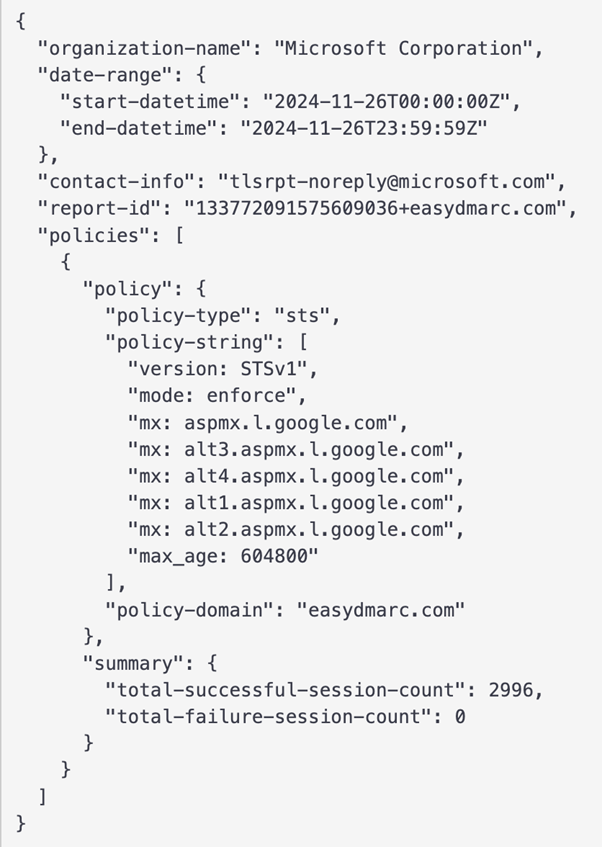
The table below explains the components of a TLS Report shown in the image above.
| Components of TLS Report | |
| organization-name | Name of the reporting party |
| date-range | Timeframe for the collected results containing the start and end dates as a subcategory |
| contact-info | Contact information |
| report-id | Unique report identifier |
| policies | This section contains information about the various active policies for the given domain (STARTTLS, DANE, DNSSEC, MTA-STS). In the case of MTA-STS, for example, this section will repeat the policy file string |
| summary | Provides the session count for successful and failed sessions |
| failure-details | Mentions what went wrong. The “result type” can take one of the 10+ set values, depending on the failure’s root cause. This line also includes information on the sending server, receiving IP, and its MX hostname |
How Does MTA-STS Work?
MTA-STS publishes a policy that compliant sending mail servers use to validate TLS when delivering email to your domain. It tells the sending SMTP server that communication with your email server must be encrypted, and the domain name in the TLS certificate and the policy must match. This helps ensure that all communication delivered to your inbox is encrypted.
The policy contains a two-part mechanism: The MTA-STS file published on an HTTPS-enabled web server, and a DNS TXT record telling senders that your domain supports MTA-STS.
Once everything is set, you’ll receive reports via TLS-RPT about failures and issues. Sending servers cache the MTA-STS file and use it repeatedly for a period indicated in the document. Upon expiration, the servers request the file again.
Let’s dive further into the two components of the MTA-STS policy.
The MTA-STS Policy File
The MTA-STS policy file is a TXT file served over HTTPS.
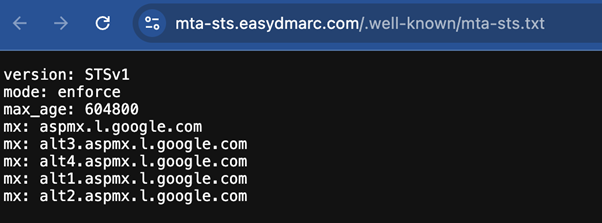
The table below explains the components of an MTA-STS file shown in the image above.
| Components of MTA-STS File | Description | Options/Details |
| version | The version of the policy file you’re viewing | The proper syntax is to include this line first, with the other components following in any order |
| mode | The policy mode | The policy mode can take either of the values below: testing: The messages that fail to pass the TLS won’t be blocked, but you’ll be able to gather data on them (similar to the DMARC quarantine policy). Enable TLS-RPT to start getting the reports. enforce: Failing the TLS means that the emails won’t be delivered (similar to the DMARC reject policy). However, you’ll still receive reports. none: While the modes above are somewhat comparable to DMARC policies, this one is very distinct. The ‘none’ policy in your MTA-STS file means fully disabling the policy. |
| mx | To fill in this part, you have to pull your MX records from the DNS | Mention each mail host on a separate line to nail the syntax of the file |
| max_age | Indicates how long the sender should cache the policy | The number is expressed in seconds and should be: between 604,800 and 1,209,600 (1–2 weeks) for testing mode between 24 hours (86,400 seconds) and 31,557,600 (one year) for enforce mode |
The MTA-STS DNS Record
For senders to “know” you have implemented the MTA-STS policy, you have to set up a DNS record. It points to the policy file and contains the following components:
- “v=:” This is the policy version number.
- “id=:” This is the policy identification number and should change once the policy is updated.
What are the Requirements for MTA-STS?
Before starting the MTA-STS setup, you need to check specific requirements, as not every server can handle the MTA Strict Transport Security policy. These requirements are:
- Can accept mail transfers via TLS connection
- Uses at least TLS version 1.2
- The TLS certificates should:
- Be up-to-date
- Have the same servers mentioned in your MX records
- Be trusted by a root certificate authority
Implement Your MTA-STS Policy
Setting up your MTA-STS DNS policy is relatively straightforward. But however impWhat Steps Are Involved in Setting Up MTA-STS?
If you’re wondering what steps are involved in setting up MTA-STS, the process typically includes preparing your domain, publishing a policy file, and configuring DNS records. Setting up your MTA-STS DNS policy is relatively straightforward, but moving from “testing” to “enforcing” takes time and focus.
Here are the steps to take before creating the DNS record and the MTA-STS file itself:
- List all the domains and subdomains you plan to protect.
- Use a TLS checker to discover any issues with its configuration
- Use a DNS checker to confirm the required DNS entries.
- Ensure that the certificates are up-to-date and TLS is on version 1.2 or higher.
- Make sure your server supports the Secure Socket Layer Certificate (SSL). HTTP won’t be enough, you will need HTTPS.
- Use a holistic solution to ease your way into policy compliance.
After these prerequisites are confirmed, begin the six-step implementation process:
Step 1. Create the Policy in Testing Mode
First of all, create the MTA-STS policy file. You can use an MTA-STS generator to speed up the initial setup. Follow the syntax above. Set the mode to “testing” initially to see how the policy performs.
Step 2. Upload the TXT File to the WEB
Ensure the file is accessible on the WEB upon request so senders can find it once the DNS record points to it. The URL should follow this syntax:
https://mta-sts.example.com/.well-known/mta-sts.txt
This means that you should create a “.well-known” folder and put the document there.
Step 3. Publish the DNS Record
Publish the DNS record, verify it with an MTA-STS checker, and move to the next phase, TLS configuration.
Step 4. Set up the TLS-RPT
Create the DNS TLS entry as mentioned above and start receiving the reports. Don’t forget that this is an MTA-STS test. Once you see everything working correctly, you can move to the next step.
Step 5. Change the Mode to “Enforce”
After this initial MTA-STS test, if everything runs smoothly, you can set the “mode” in the MTA-STS file to “enforce.” This will filter unencrypted emails.
Step 6. Update the Version ID in Your DNS Record
As the last step, don’t forget to update the DNS with the new version ID.
EasyDMARC’s managed MTA-STS tool helps simplify policy setup and ongoing management.
Why MTA-STS Matters for Email Security
In simple terms, what is MTA-STS? It is a way to strengthen your email security by ensuring encrypted communication and protecting against man-in-the-middle attacks. Combining the MTA-STS policy with TLS Reporting gives you valuable insights into potential issues while reducing the risk of downgraded, intercepted, or unauthenticated SMTP transport. Although setting up MTA-STS requires careful planning and testing, the long-term benefits, including enhanced security, better compliance, and reduced vulnerabilities, make it a vital tool for any organization. Start with testing mode, address any configuration issues, and gradually move to enforcement to secure your email ecosystem effectively. You can explore more detailed setup and troubleshooting guides in our relevant blogs.

 We’re glad you joined EasyDMARC newsletter! Get ready for valuable email security knowledge every week.
 You’re already subscribed to EasyDMARC newsletter. Continue learning more about email security with us


